

Learn how to find Facebook Marketplace deals faster using a simple alert app that helps you discover listings before they’re gone.
If you spend any time on Facebook Marketplace or Craigslist, you probably know the feeling of missing a great deal by just a few hours. A piece gets posted… you see it too late… and it’s already gone.
That has been my biggest frustration lately, especially when it comes to yard sales and garage sales. I absolutely love yard sale season, but ever since the pandemic, I feel like it has been so much harder to actually find them.
People don’t advertise them like they used to, and when they do, figuring out where the listing even is on Facebook Marketplace can feel like a full-time job. And then if you do happen to find one, it has either already started, been picked over, or you missed it altogether.
I have been saying to Matt for the last few years, what is going on? Are people just not having yard sales anymore? Honestly, the last couple of years, the only sales I’ve gone to were the ones I happened to drive by, not ones I found ahead of time and planned for.
Then, right before our family vacation in May, the developers of the app DealScout reached out to see if I’d be willing to try their app and give them feedback. After hearing what it did, I got excited right away because I knew it could be such a game-changer for so many people, not just someone like me trying to find yard sales, but also furniture flippers looking for furniture, resellers searching for certain items, booth owners sourcing inventory, and really anyone who uses Facebook Marketplace or Craigslist to find specific things.
So, I told them I’d test it out for a few months and really use it before sharing it here. I wanted to know if it was actually helpful in real life, not just in theory. After using it, I can absolutely see why it would be helpful for so many people to find Facebook Marketplace deals.
{Affiliate links are used in this post. Click on any of the underlined links to find the products I am talking about. You can read my disclosure HERE.}
How to Find Facebook Marketplace Deals Faster
How DealScout Works
What I like most about DealScout is that it takes the constant searching off your plate and lets you find Facebook Marketplace deals faster than you could on your own.
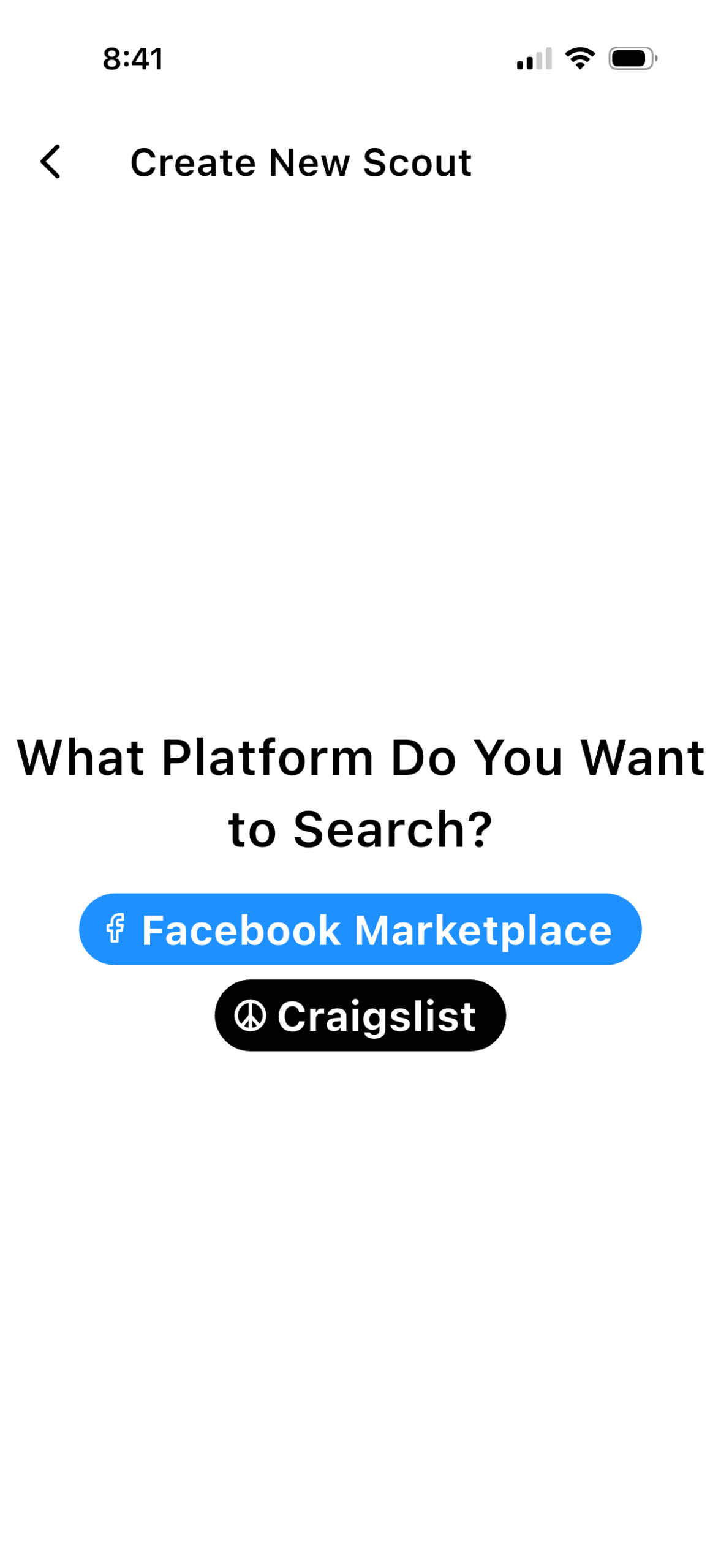
Instead of opening Facebook Marketplace or Craigslist over and over throughout the day, you set up what DealScout calls “scouts.” A scout is basically an alert for whatever you’re looking for. It can be something broad like yard sale, estate sale, garage sale, or rummage sale, or something really specific like dresser, nightstand, vintage mirror, booth display, Pyrex, or a certain brand or item you’ve been trying to find.
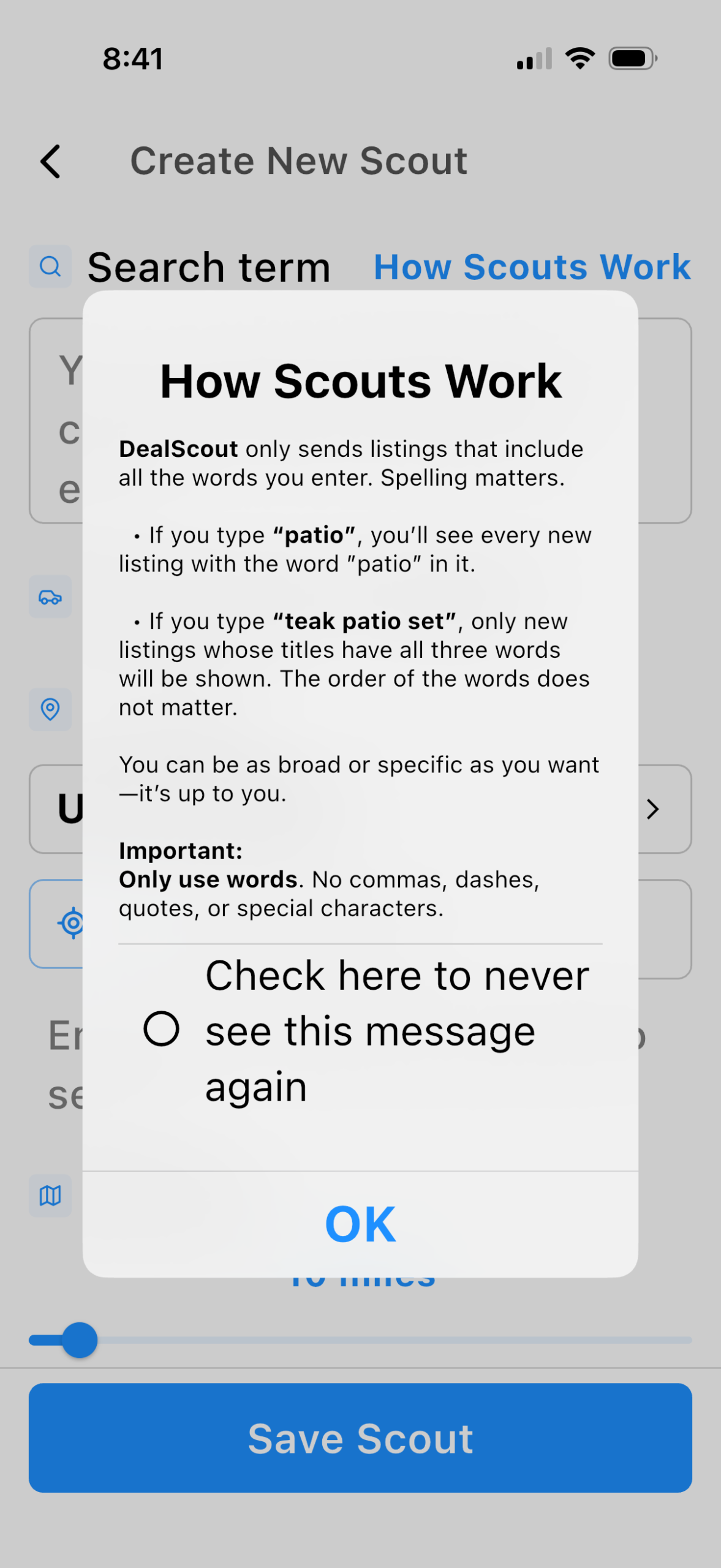
When you set up a scout, you can really customize it to fit what you’re looking for. You can add positive words you do want included in the search, negative words you want it to leave out, and set your distance parameters so you’re only seeing listings within the area you’re willing to drive. You also get to choose where you want that scout to search, whether that’s Facebook Marketplace or Craigslist.
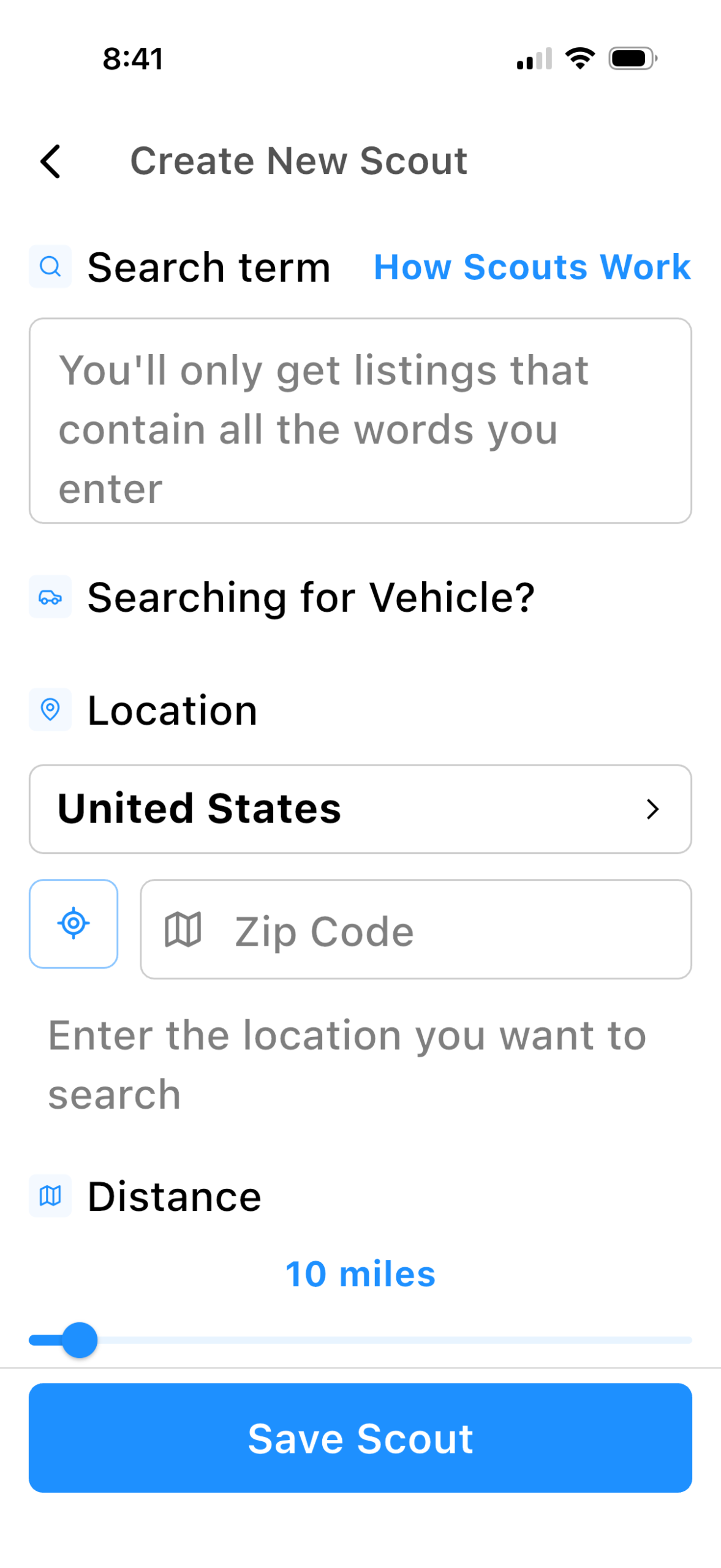
Once your scouts are set up, DealScout keeps watch for you in the background and sends you alerts when something matching your search pops up. That’s what makes it so helpful. Instead of constantly checking Facebook Marketplace and Craigslist and still missing things, the app is doing the searching for you.
Another thing to know is that DealScout has different membership levels, depending on how many scouts you want to run and how much you want to track.
There is also a free version if you just want to try it before deciding if you need more. The free plan includes one Scout that searches once every hour, along with the same Positive Keyword and Negative Keyword filtering available in the paid plans. The biggest differences are how often your Scout searches and how many Scouts you can create.
One thing I thought was really interesting is that DealScout is currently the only app offering free alerts for paid listings on both Facebook Marketplace and Craigslist, which makes it an easy way to test the app before upgrading if you decide you want more frequent alerts.
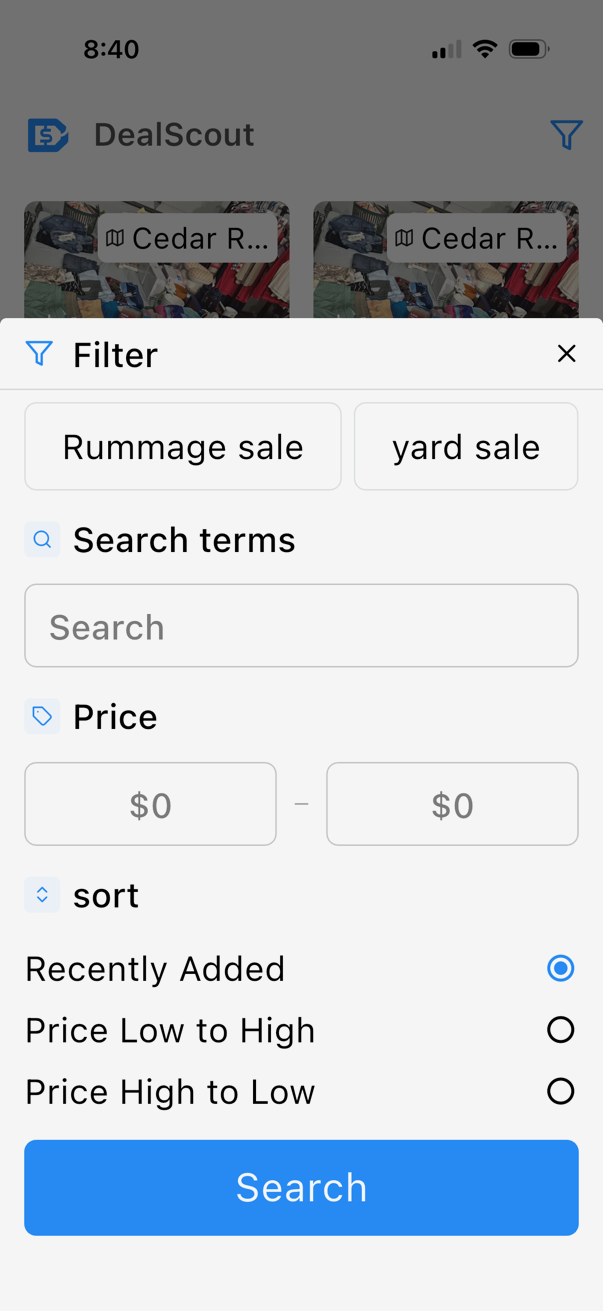
If I were setting up DealScout for the first time, here’s where I’d start:
If you decide to try DealScout, I’d start by setting up just a few scouts for the things you search for most often.
For me, that would be things like:
- yard sale
- garage sale
- estate sale
- rummage sale
- dresser
- nightstand
- vintage mirror
If you’re using it for your home, your scouts might look totally different. You could set up alerts for things like:
- dining table
- patio furniture
- sectional
- bunk beds
- washer and dryer
- baby items
- home decor
- specific brands or styles
And if you flip furniture, resell, or run a booth, you can set up scouts for the exact types of items or brands you’re always hunting for.
One thing I learned while using the app is that it’s actually better to avoid creating a bunch of Scouts that all search for basically the same thing.
For example, instead of creating separate Scouts for yard sale, garage sale, moving sale, and rummage sale, create one broader Scout and then use the Positive Keywords section to include all of those different terms (and even common misspellings). That helps reduce duplicate notifications while still catching more listings.
The same strategy works for furniture, too. Instead of creating separate Scouts for dressers, nightstands, and chests of drawers, you could create one broader furniture Scout and add those items as Positive Keywords. Then use Negative Keywords to remove listings you don’t want to see, like mattresses or other items that aren’t relevant to your search.
Who I think this app is great for:
After using it for a few months, I really think DealScout could be helpful for anyone who wants to find Facebook Marketplace deals.
Of course, if you’re like me and you love yard sales, garage sales, estate sales, and rummage sales, it can be such a helpful way to actually find them without spending hours trying to track down listings.
I also think it’s a great tool for furniture flippers who are always on the hunt for dressers, nightstands, tables, or project pieces, for resellers looking for specific brands or items, and for booth owners or shop owners who are constantly sourcing inventory.
But it’s not just for people who buy to flip or resell. I think it’s just as helpful for anyone searching for something for their home or family, a dining table, a dresser, patio furniture, kids’ items, home decor, tools, appliances, or really anything specific they’ve been trying to find on Facebook Marketplace or Craigslist.
That’s what makes it so useful. Whether you’re trying to source inventory for a business, find the best yard sales in your area, or just track down a dining table for your home without constantly checking Marketplace, it helps you find Facebook Marketplace deals faster.
We do not need another reason to be scrolling on our phones all day. Any time I can put my phone down but still have something working for me in the background, sign me up. That’s one of the biggest reasons this app stood out to me. Not only does it help you find the things you’re looking for, but it also gives you back your time, and that is a resource we can never get back. That part alone is priceless to me.
FAQ:
Why am I seeing duplicate notifications?
Every once in a while, you may notice what looks like a duplicate listing. Sometimes that’s because different people have posted the same sale more than once, or someone reposted their listing to get more visibility. More commonly, it happens when multiple Scouts are searching for very similar things. If the same listing matches more than one Scout, you’ll receive more than one alert.
Keeping similar searches together in one Scout and using Positive Keywords instead of multiple overlapping Scouts usually solves the problem.
Why didn’t DealScout find a listing I saw on Facebook?
Every once in a while, you may come across a listing on Facebook that didn’t show up in DealScout. In most cases, there’s a simple explanation. The listing may have been shared only in a Facebook Group instead of on Facebook Marketplace; it may have been outside the search radius you selected, or the wording in the title may not have matched your Scout exactly. For example, if your Scout is searching for “yard sale” but someone listed it as “yardsale” without the space, it won’t be picked up unless you’ve added that spelling as a Positive Keyword.
After you’ve used the app for a little while, it’s worth taking a few minutes to fine-tune your Scouts by adding alternate spellings, common keywords, and adjusting your search settings. Doing that can help you catch even more of the listings you’re looking for.
One thing I also appreciate is that the DealScout team actually helps users optimize their Scouts. If you aren’t getting the results you expected, you can reach out to them for help adjusting your searches so you’re finding more of what you’re actually looking for. I think that’s a nice touch, especially when you’re first getting started.
Try DealScout with a Discount:
If you want to test DealScout for yourself, be sure to CLICK HERE so the 50% off discount is applied to your first month.
If, for some reason, the discount doesn’t automatically show up, you can use the code MYCREATIVEDAYS at checkout.
This is one of those tools where I think it’s worth just testing for yourself. Set up a few scouts, let it run, and see what shows up in your area. You might be surprised at what you’ve been missing.
I shared all about my experience with this app on my podcast as well! You can listen to the full episode HERE.
PIN THIS POST!

If you liked the How to Find Facebook Marketplace Deals post, you will also love these:
How to Find the Best Furniture to Flip on Facebook Marketplace
Shop Yard Sales Effectively – How To
1 Comment